

Sony Smart Watch Review
This post contains affiliate links. As an Amazon Associate I earn from qualifying purchases.
This Sony smart watch review looks back at a discontinued gadget that let you check your phone from your wrist. The appeal was simple: see who was calling or read a message without searching through your bag for your phone.
Sony’s old SmartWatch models are now vintage tech. You may still find used or old-stock examples, but an old listing doesn’t guarantee that the watch will connect to a modern phone or run the apps described in its original advertising.
Below, I explain the differences between Sony’s SmartWatch models, revisit the original review and cover what to check before buying one secondhand. If you want a watch for everyday use now, skip to the modern smartwatch alternatives.
Which Sony SmartWatch Is This?
Sony used similar names for several different watches. The small OLED screen and 15.5g watch body described in my original review belong to the first SmartWatch, the MN2. The SmartWatch 2 was a later model, with a larger screen. Check the model number before buying a watch, charger or replacement strap.
| Model | Introduced | Main Differences |
|---|---|---|
| Sony SmartWatch MN2 | 2012 | 1.3-inch OLED touchscreen, 128 × 128 pixels and a 15.5g body without the strap. |
| Sony SmartWatch 2 (SW2) | 2013 | 1.6-inch TFT screen, 220 × 176 pixels, NFC-assisted pairing and micro-USB charging. |
| Sony SmartWatch 3 (SWR50) | 2014 | Android Wear software, built-in GPS and 4GB of storage. |
These details come from Sony’s original announcements for the MN2, SW2 and SmartWatch 3. They describe the products at launch, not a promise of current app compatibility.
What the Original Sony SmartWatch Could Do
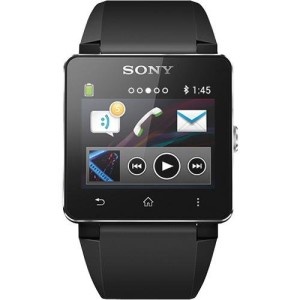
The original SmartWatch connected wirelessly to a compatible Android phone. At launch, its functions included call and message notifications, music controls and app extensions for services such as Twitter and Facebook. Some interactions used preset replies, with the phone doing much of the work.
I liked the convenience of glancing at my wrist rather than hunting around in my bag. The small, lightweight design was part of its appeal, and the colored bands let you change its appearance.
Those old social-media and app features need historical context. Services have changed since the watch launched, so don’t buy an MN2 or SW2 expecting every function from an old review to work today.
Sony Smart Watch Review: My Original Impressions
Battery life was one of the things I liked in my original review. At the time, getting several days between charges compared favorably with my iPod, which seemed to be dead after a couple of hours of music! A used watch’s battery may behave very differently now.
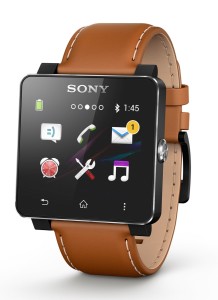
I also liked being able to check incoming calls and messages discreetly. My original review found the display harder to see in direct sunlight, so I would cup a hand around it. That observation shouldn’t be read as a test of every later Sony model.
The photos here are retained from the original post. Before ordering accessories for an old Sony watch, check the exact model and connector rather than relying on the words “Sony SmartWatch” in a listing.
Can You Still Use a Sony SmartWatch?
Possibly, but check the particular watch and phone together. Bluetooth alone doesn’t prove that an old companion app will install or work correctly. The MN2 and SW2 used Sony’s app system; the SmartWatch 3 used Android Wear. They aren’t interchangeable.
Sony still has a SmartWatch 2 support page and an official SW2 application page. Start with the documentation for your exact model. The presence of an app download doesn’t confirm compatibility with your current Android version.
Before Buying a Used Sony SmartWatch
- Ask for the exact model number and a photo of the working watch.
- Check whether the correct charging cable or connector is included.
- Ask how long the battery currently lasts and whether charging works reliably.
- Confirm pairing and the features you need with your phone model and Android version.
- Check the seller’s return policy if the watch won’t connect.
I would treat one as a retro gadget or a project for someone who enjoys older electronics. For dependable daily notifications and fitness features, I’d compare modern watches first.
Modern Alternatives to the Sony SmartWatch
The watches below offer some of the conveniences that originally made Sony’s watch appealing. They are alternatives from other brands, not new Sony SmartWatch models. These comparisons use manufacturer specifications; I haven’t personally tested these two watches.
Amazfit Bip 6: A Large Rectangular Display
The Amazfit Bip 6 has a 1.97-inch AMOLED screen, built-in GPS and Bluetooth calling with a connected phone. It works with compatible Android phones and iPhones through the Zepp app, although message-reply features differ by phone. Amazfit quotes up to 14 days of typical battery life; frequent GPS use and other settings reduce that figure.
This is the one I’d compare first if the large screen and less frequent charging appeal to you. See the Amazfit Bip 6 on Amazon.
Garmin vívoactive 6: Fitness Tracking and Phone Alerts
The Garmin vívoactive 6 combines an AMOLED display with built-in GPS, activity tracking and sleep features. It displays notifications when paired with a compatible iPhone or Android phone. Some functions, including on-watch text replies, are Android-only. Garmin quotes up to 11 days in smartwatch mode, with shorter battery life when using GPS or the always-on display.
Compare this one if fitness tracking matters as much as seeing messages on your wrist. See the Garmin vívoactive 6 on Amazon.
Before ordering either watch, check the phone requirements, case size and exact listing. Amazon prices, sellers and availability can change.
Specifications: Amazfit Bip 6 and Garmin vívoactive 6.
Sony SmartWatch Questions
Is the Sony SmartWatch discontinued?
Yes. This post covers Sony’s discontinued SmartWatch family. A used or old-stock listing is different from a newly released watch, so check its condition and software compatibility carefully.
Does the Sony SmartWatch work with an iPhone?
The MN2 and SW2 discussed here were designed around Android phones. Don’t assume they work with an iPhone. The Amazfit and Garmin alternatives above support compatible iPhones, with some differences in available features.
Is a Sony SmartWatch worth buying now?
It may interest a collector or someone revisiting early wearable tech. For an everyday watch, I’d give priority to current phone compatibility, reliable charging and the features you’ll actually use. The old Sony remains an interesting gadget to read about, even if a newer watch is the better purchase.